

SpeedBox 1.1 B.Tuning for Bosch (Smart System)
PARAMETERS:
Maximum speed: Unlimited (35 km/h recommended max)
Speed limit setting: YES
Display:
Actual speed: NO
Correct distance value: After countdown
Activation/deactivation (Do not do while riding):
WALK function / - + - + / SpeedBox App
Activation/deactivation indication: YES (3.5/2.5 km/h)
Compatible with:
All Smart System displays
All Smart System motors
SpeedBox App
Incompatible with:
Bosch Rim Magnet
ABS system
Tuning chip with Bluetooth technology and mobile app for your e-bike with 4th generation Bosch motors with Smart System. Enjoy unlimited riding and all the benefits the SpeedBox App brings.
SpeedBox 1.1 B.Tuning for Bosch provides a unique connection between the e-bike and a mobile phone, allowing you to deactivate the e-bike's speed limiter.
The actual speed and other riding data will be displayed correctly in our SpeedBox App - directly on your phone's screen.
How does SpeedBox 1.1 B.Tuning for Bosch work?
For the correct activation of all SpeedBox functions, it is necessary, after turning on the e-bike with the SpeedBox installed, to enter the menu and access the wheel circumference value.
Tuning activation/deactivation must always be done before riding, not during the trip!
Furthermore, this chip is very easy to use. You can activate the SpeedBox 1.1 B.Tuning chip in the mobile app or on the e-bike display. The e-bike display will briefly show 3.5 km/h (2.2 mph), and from that moment on you can ride at a speed of 35 km/h. You can change the default speed limit to any limit (up to 99 km/h), but to minimize the risk of error codes, we recommend not exceeding 35 km/h.
To deactivate the chip function, reactivate the WALK function (press and hold the "-" button). The display will show 2.5 km/h (1.6 mph) and the 25 km/h speed limit will be active again. The e-bike works just as it did before installing the chip.
We also thought of e-bikes that do not have a WALK function available or active. In this case, you can activate or deactivate the tuning by switching twice between two modes, i.e., the button sequence "- + - +".
When you start the SpeedBox App for the first time, you will be asked to set a PIN. You will then use this PIN every time you run the SpeedBox App. After selecting a PIN, you will also be asked to set a service password, which you will use in case you forget the PIN or want to change it.
The maximum assistance speed can be changed again by changing the modes from TURBO mode down three levels and then up three levels: eMTB - TOUR+ - ECO - TOUR+ - eMTB - TURBO. Then the current speed limit will be displayed. To change the maximum speed, activate/deactivate the WALK function or rotate the wheel 360°. 2.5 km/h on the display corresponds to a 25 km/h limit, 3.5 corresponds to 35 km/h, etc. The last limit displayed is saved after 15 seconds of inactivity.
After riding, leave the e-bike on for a while until SpeedBox completes the "countdown" process (the trip time will continue on the display until it stops and shows the correct distance traveled) to prevent detection of the SpeedBox tuning on your e-bike.
SpeedBox App for SpeedBox 1.1 B.Tuning for Bosch
The SpeedBox app designed specifically for SpeedBox 1.1 B.Tuning for Bosch uses Bluetooth technology to connect your e-bike to your mobile phone. After downloading the app and connecting your mobile phone to the bike, you can view current data and riding parameters on your phone's screen. It is possible to save information about all your trips, compare with friends, and track your own performance. So you will fully enjoy the ride and leave the parameter checking for later.
SpeedBox App capabilities:
- Chip control
- Save and view trip data
- Set maximum support speed
- Hide function
- Motor diagnostics
The operation of the SpeedBox 1.1 B.Tuning chip is not conditional on using the SpeedBox App. However, it is a great accessory that will give you a complete overview of your performance.
Download the SpeedBox App to your phone before ordering the SpeedBox 1.1 B.Tuning chip. You will try the demo version, get to know all the functions, and at the same time ensure that the application works perfectly on your phone. To connect to the SpeedBox 1.1 B.Tuning chip, your phone must have Bluetooth version 4.0 or higher.


Assembly
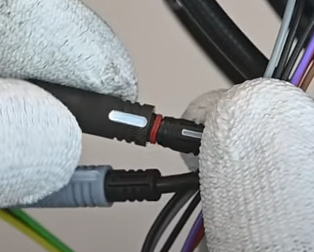
To connect the SpeedBox chip to an e-bike, we use colored connectors equipped with a key for a proper connection, so the chip is really easy to install. You can download instructions or watch videos that will guide you through installing SpeedBox. Removing the chip is just as easy as mounting it. If you have any connection problems, do not hesitate to contact us.
If you want a SpeedBox on a new bike, you must first ride at least 10 kilometers on the bike.
Important:
Connect the male-female connectors in the direction of the lock. Do not rotate the connectors during connection!