


PARAMETERS:
Maximum speed: Unlimited (35 km/h max recommended)
Speed limit setting: YES
Display:
Actual speed: NO
Correct distance value: After countdown
Activation/deactivation (Do not perform while riding the bike):
WALK function / - + - +
Activation/deactivation indication: (3.5/2.5 km/h)
Compatible with:
All Smart System displays
All Smart System motors
Incompatible with:
Bosch Rim Magnet
ABS system
SpeedBox App
Tuning chip for e-bikes with the latest 4th generation Bosch motors with Smart System.
SpeedBox 1.1 for Bosch allows you to deactivate the e-bike speed limiter.
If you want to monitor the correct speed and all riding data during your trip, we recommend purchasing the SpeedBox 1.1 B.Tuning for Bosch - You can track actual riding values in our SpeedBox App - directly on your phone screen.
How does SpeedBox 1.1 for Bosch work?
To correctly activate all SpeedBox functions, after switching on the e-bike for the first time, it is necessary to enter the menu and display your e-bike's wheel circumference.
Tuning activation/deactivation must always be done before riding, not during the trip!
For the correct activation of all SpeedBox functions, after switching on the e-bike with the SpeedBox installed, it is necessary to enter the menu and access the wheel circumference value.
To activate the SpeedBox 1.1 chip, briefly enable the WALK function on the e-bike's control unit (press and hold the "-" button). The e-bike display will briefly show 3.5 km/h (2.2 mph), and from that moment on you can ride at 35 km/h. You can change the default speed limit to any limit (up to 99 km/h), but to minimize the risk of error codes, we recommend not exceeding 35 km/h.
To deactivate the chip function, reactivate the WALK function (press and hold the "-" button). The display will show 2.5 km/h (1.6 mph), and the 25 km/h speed limit will be reactivated. The e-bike functions exactly as it did before the chip was installed.
We also thought of e-bikes that do not have a WALK function available or active. In this case, you can activate or deactivate the tuning by switching twice between two modes, i.e., by pressing the "- + - +" buttons.
The maximum assistance speed can be changed by switching modes from TURBO mode down three levels and then up three levels: eMTB - TOUR+ - ECO - TOUR+ - eMTB - TURBO. The current speed limit will then be displayed. To change the maximum speed, activate/deactivate the WALK function or rotate the wheel 360°. 2.5 km/h on the display corresponds to the 25 km/h limit, 3.5 corresponds to 35 km/h, etc. The last displayed limit is saved after 15 seconds of inactivity.
After riding, leave the e-bike turned on for a while until SpeedBox completes the "countdown" process (the ride time will continue on the display until it stops and shows the correct distance traveled) to prevent detection of the SpeedBox tuning on your e-bike.
Installation
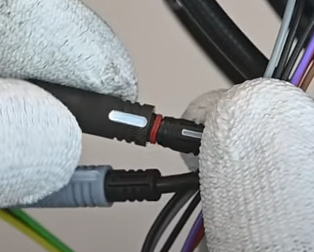
To connect the SpeedBox chip to an e-bike, we use colored connectors equipped with a key for proper connection, making the chip truly easy to install. You can download the instructions or watch videos that will guide you through installing SpeedBox. Removing the chip is as easy as installing it. If you have any connection problems, do not hesitate to contact us.
If you want to install SpeedBox on a new bike, you must first ride at least 10 kilometers on the bike.
Important:
Connect the male-female connectors in the direction of the lock. Do not twist the connectors during connection!
Notice
Please be aware that the use of modified e-bikes on public infrastructure may conflict with current legislation in some countries. The manufacturer is not responsible for damages resulting from the use of SpeedBox products. E-bikes equipped with SpeedBox products cannot be used on roads, bike paths, and public areas. E-bikes equipped with SpeedBox products may only be used on your own property, solely at your own risk. The use of SpeedBox products may void your e-bike's warranty.
We recommend using additional protective equipment to prevent injury.
During brief breaks, to continue riding smoothly, we recommend keeping one foot on the pedal so the countdown does not start.
In case of a longer break, a partial countdown should be allowed.
After a long trip, the countdown may take several minutes.
Do not turn off the display until the countdown is finished.
Tuning activation/deactivation must always be performed before riding, not during the trip.
We recommend not exceeding a speed of 35 km/h.